


Lighting Studio Software
Key Features
FIBERLI LIGHTING STUDIO
Design the light. Run the show.
Fiberli Lighting Studio is a professional Windows-based lighting control application that brings LED fixture mapping, pixel addressing, dynamic animation design and live show operation into one workspace.
Designed for architectural, stage and decorative LED applications, it connects the creative workflow with practical system control. Lighting scenes can be prepared and previewed before being sent to compatible hardware through Art-Net.
Features and benefits
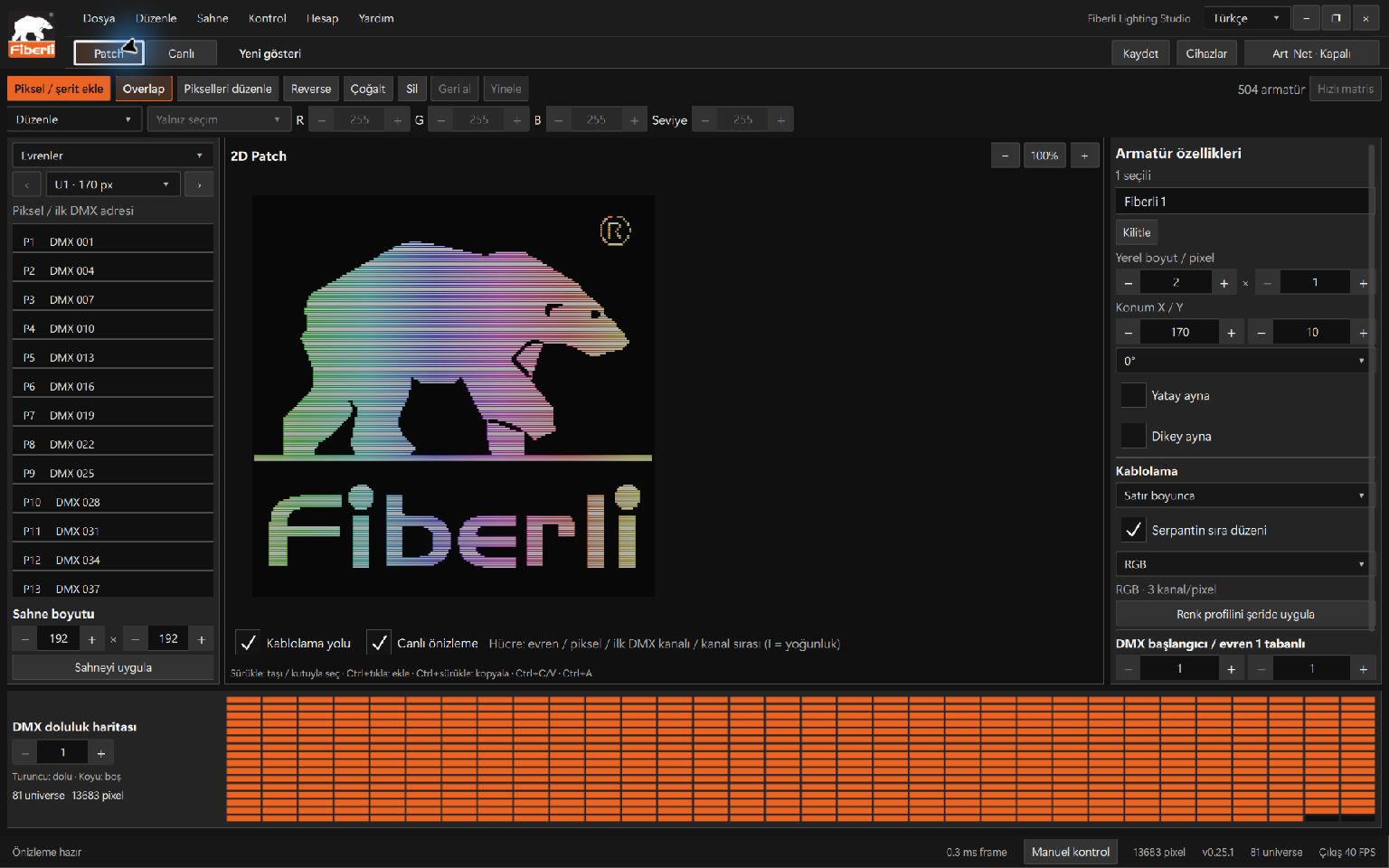
2D LED mapping and addressing
Position fixtures on a two-dimensional canvas, define pixel layouts and manage DMX channel and universe mappings. Save the setup as part of the project for future adjustments.
Flexible animation creation
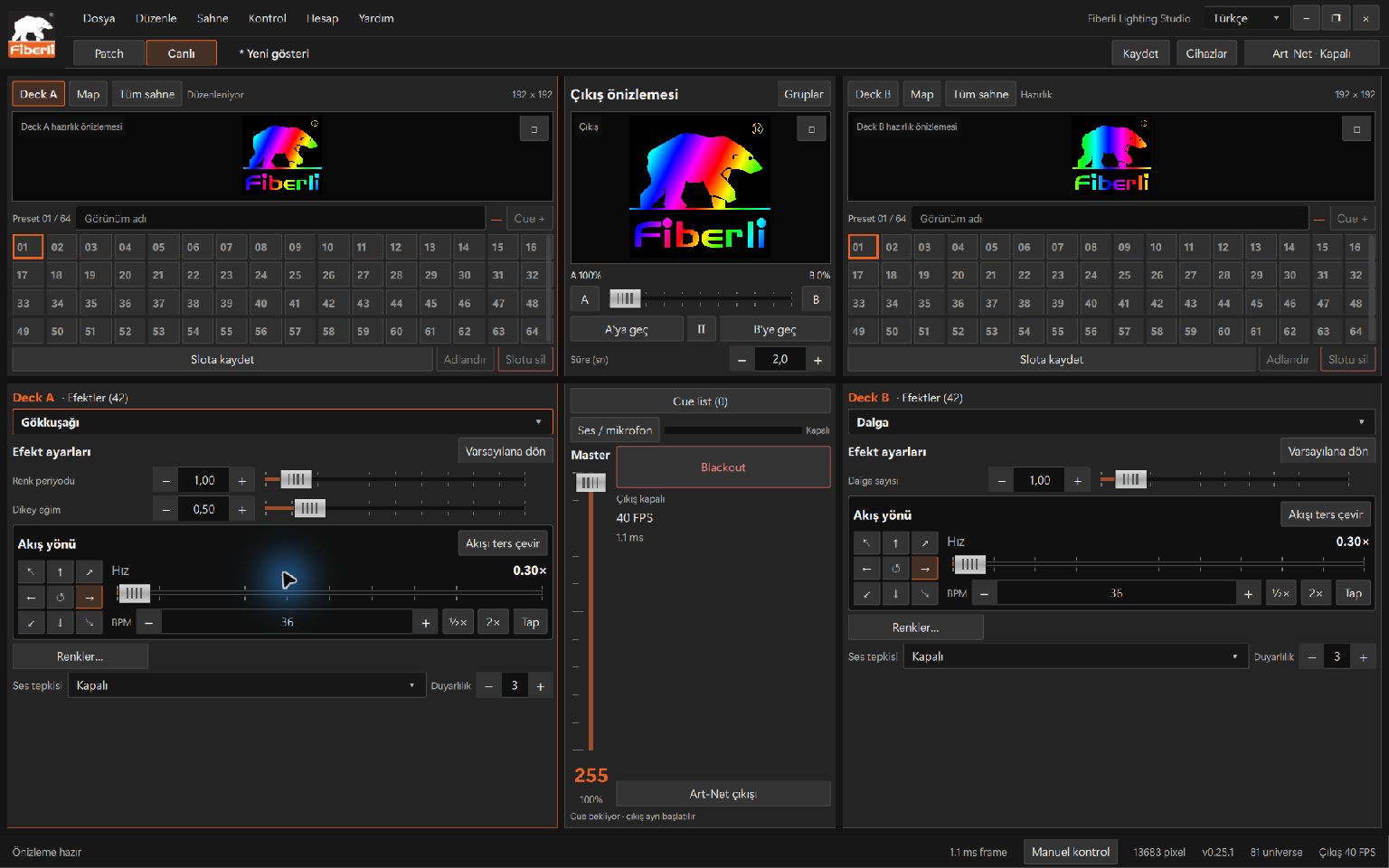
Build lighting content with 42 built-in effects, editable color palettes, scrolling text, images and video sources. Preview your scenes before enabling physical output.
Live show control
Prepare looks on A/B decks and manage smooth transitions with presets, cues and a crossfader. Operators can make changes during live productions.
Timelines and scheduling
Save reusable looks in slots, arrange them on a timeline and set up scheduled playback with day-and-time rules where supported by the installation.
Art-Net system output
Send lighting data from the Windows computer over Ethernet to compatible Art-Net nodes. Configure device, port and universe assignments to suit the project.
Android remote operation
Use the paired Android app to select animations and slots, control playback and speed, and run pixel tests. The Windows computer remains responsible for lighting output.
How it works
1. Map your fixtures. Arrange fixtures on the 2D canvas and configure pixel, channel, universe and device assignments.
2. Create your content. Customize built-in effects or use image and video sources, then preview your lighting scenes.
3. Build your show. Prepare live transitions with A/B decks and slots; use timelines and scheduling rules where required.
4. Connect and operate. Send Art-Net data from the licensed Windows application and use Android for remote show operation.
Important: Physical Art-Net output is generated by the Windows application, not the Android phone. Nodes, fixture compatibility, power supplies and network capacity must be planned for each project. The free Preview edition does not provide physical Art-Net output.
Where can it be used?
Architectural lighting: Dynamic color transitions, pixel animations and decorative lighting compositions across building Facades and architectural features.
Stage and events: LED matrices, scenic elements and live, operator-controlled lighting effects.
Hospitality and commercial spaces: Lighting scenes for arrival areas, entertainment venues and shared spaces with different visual atmospheres.
Lighting Studio supports the workflows of lighting designers, system integrators, electrical and automation teams, show operators and facility technicians. Hardware compatibility is evaluated project by project.
Application screenshots
The following gallery shows screens from the Android remote-control app, followed by the LED layout and animation workspaces in the Windows desktop application.


Windows desktop application screenshots
Explore the LED layout and patching interface, as well as the animation design workspace, in the Windows version of Lighting Studio.
Download Lighting Studio
Get the current Windows Studio installer and Android remote-control app from the official download page. Review the available installation and licensing options for your lighting control setup.


